• AI / MCP / Browser Automation
Chrome Browser MCP [before browser agents were boring]
A small Chrome extension, a polling server, and an MCP stdio package were enough to let an AI coding assistant control a real browser session. It worked, but the interesting part now is what the design teaches about b...
Source code: github.com/yuval1024/chrome-browser-mcp
I built a Chrome Browser MCP before browser agents became a normal thing.
The project is simple:
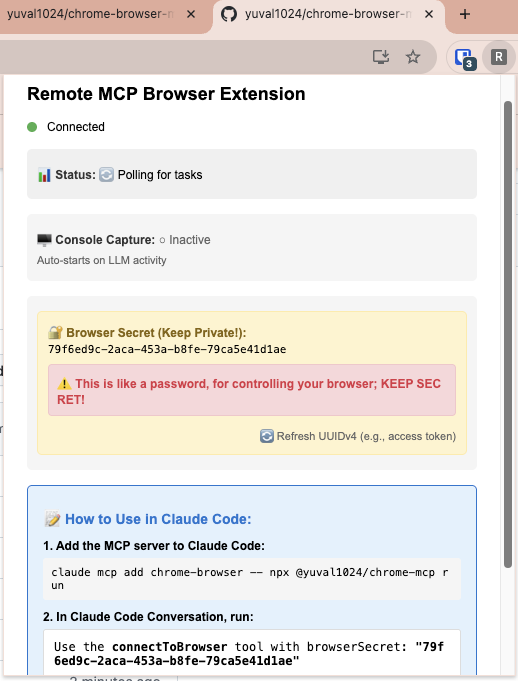
- A Chrome extension runs inside the browser and executes tasks.
- A small server queues tasks and receives responses.
- An MCP stdio package exposes browser tools to an AI coding assistant.
That is enough to let an agent inspect tabs, capture screenshots, read DOM snapshots, navigate pages, and drive browser interactions from a real logged-in Chrome session.
Why build it
The basic problem was that coding agents could write web code, but they could not reliably see or drive the browser I was actually using.
For local development that matters. A browser is not just a URL renderer. It has logged-in sessions, local state, cookies, extension state, console output, failed network calls, and weird UI timing. If an agent cannot inspect those things, the loop becomes:
- Agent edits code.
- Human opens the page.
- Human describes what broke.
- Agent guesses.
The extension changed that loop. The agent could ask Chrome directly.
Architecture
The repo has three pieces:
chrome-extension/- the browser-side executor.chrome-mcp-package/- the MCP stdio package used by Claude Code or another MCP client.mcp-server/- the polling server that connects the two sides.
The flow is:
- The extension polls the server for pending tasks.
- The MCP package creates a task for a browser secret.
- The extension picks up the task, executes it in Chrome, and posts the result.
- The MCP package polls for the result and returns it as a tool response.
Polling is not glamorous, but it is easy to reason about. It also avoids keeping a direct inbound connection to the user’s browser.
What worked
The useful tools were the boring ones:
getAllTabsgetCurrentUrltakeScreenshotnavigateTabcreateTabcloseTabgetDOMSnapshotgetHTMLSourcegetConsoleLogs
This is already enough for many debugging loops. If the agent can see the active page, get console logs, inspect the DOM, and navigate after a code change, it can close a lot of frontend tasks without a human narrating the browser state.
The important design point is that the browser is the source of truth. Not Playwright’s fresh profile. Not a synthetic browser in a sandbox. The real session.
What I would change today
If I wanted to make this production-grade, I would change three things.
First, I would use WebSockets or another lower-latency channel instead of one-second polling. Polling is fine for a prototype, but it adds latency and unnecessary server load.
Second, I would add accessibility-tree support. DOM snapshots are useful, but agents should reason over the same semantics that testing tools and screen readers use. ARIA roles, accessible names, and focus state are often a better automation interface than raw selectors.
Third, I would add site-specific adapters for common products. Generic HTML parsing is flexible, but brittle. For heavily used sites, a small JavaScript adapter that exposes the operations the agent actually needs is usually cleaner.
Security shape
This is browser control. It should be treated as sensitive.
The browser secret controls access to the extension. If someone has it, they can ask the extension to run browser tasks. For that reason, the public repo is self-hosted by default: run your own server and configure the extension and MCP package to use it.
I would not treat this design as a polished consumer product. It is a compact reference implementation for local agent-browser control.
What aged well
The part that aged well is the shape:
- Keep the browser local.
- Expose browser state as tools.
- Make screenshots, DOM, logs, and navigation first-class.
- Let the agent use the same browser session as the human.
The implementation is older now. Browser-agent tooling has improved. But the core idea still feels right: the agent should not be blind after it edits the frontend.
The browser is part of the development environment. It deserves an agent interface.